
Which 4D BIM tool stands out?
4D-BIM (Building Information Modeling) is a visualization tool—and much more besides. After all, its added value lies primarily in the quality of the data and schedule integration it enables, as well as in the analytical evaluation of construction processes. 4D-BIM has therefore become a strategic tool for general contractors, who, as cumulative service providers, contractually coordinate a wide range of trades and manage their schedules during construction. This is particularly crucial in scheduling, given the increasing complexity of construction projects, which requires transparent communication. By linking 3D models with time-related information, 4D-BIM enables realistic simulations of specific construction processes. It also provides clarity and understanding in the interplay between planning, execution, and clients.
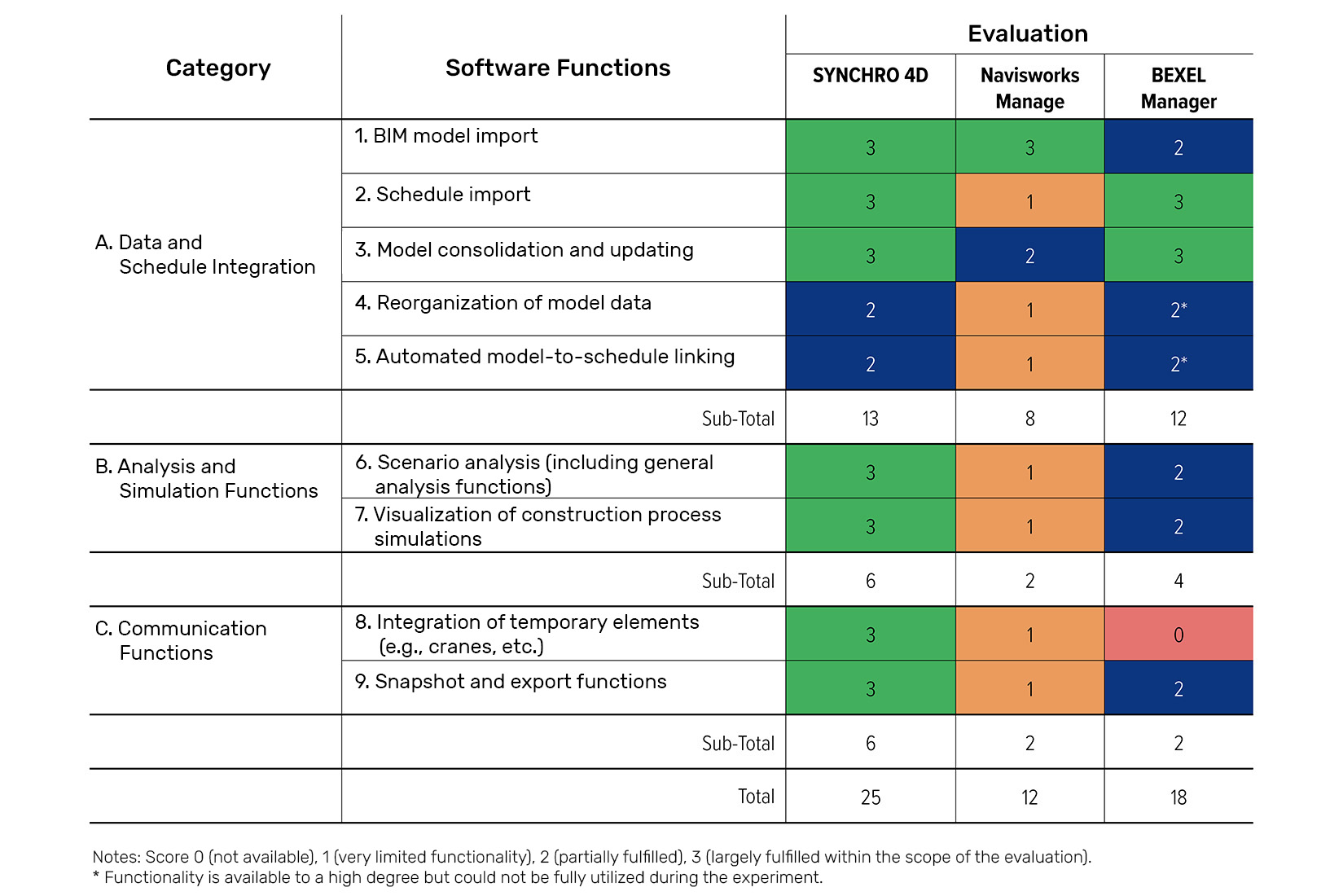
Synchro 4D, Bexel Manager, and Navisworks Manage are common 4D BIM programs. Practical experience shows that each program plays to its own strengths—especially since they usually have to demonstrate their capabilities in simplified MS Project schedules, where they convert linear schedule structures into a consistent 4D logic. Key factors here include the import logic and data interpretation, the quality and structure of the schedules, as well as usability and model linking. The individual tools take different approaches in this regard:
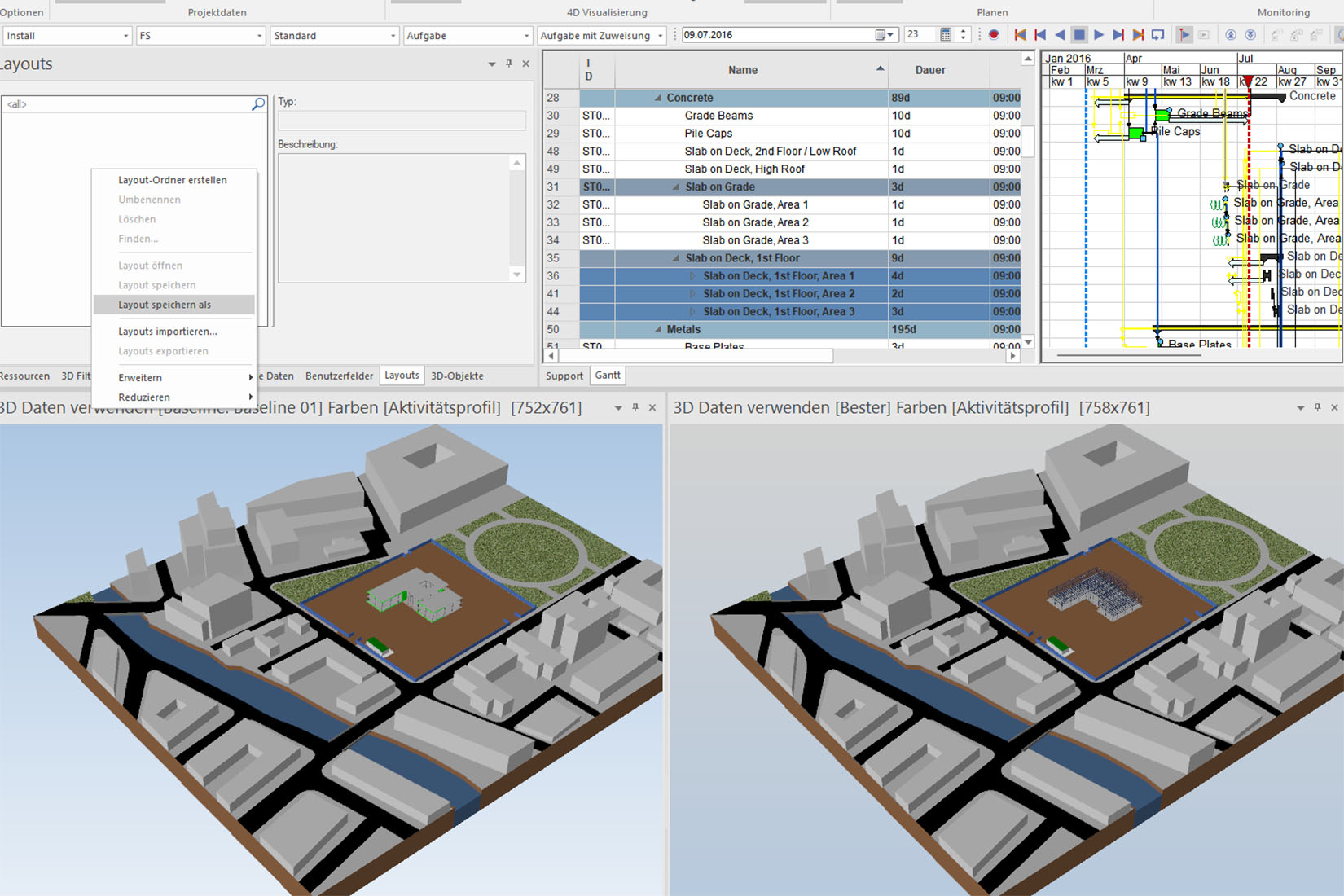
Synchro 4D is considered one of the most powerful programs for 4D simulations. It demonstrates its outstanding capabilities in the robust linking of schedules and models, in the detailed control of resources, construction processes and dependencies, in the high-quality processing of complex MS Project structures, and in high-quality simulations, logistics checks, and scenario analyses.
For simple use cases, however, the tool is overkill. Its usability and data structure, in particular, prove to be obstacles. In addition, imports from MS Project often require post-processing and restructuring. Accordingly, Synchro 4D proves particularly valuable in projects where 4D serves not only for visualization but also actively functions as a planning tool.
Bexel Manager strikes a balance between depth and user-friendliness, with a clear focus on efficiency and intuitive usability. It truly shines in the combination of 4D and 5D. Schedules from MS Project integrate well. It also impresses with structured workflows for linking components and processes. However, its import quality depends heavily on the structure of the MS Project plan. Furthermore, it proves to be somewhat inflexible when dealing with complex logic. If highly dynamic adjustments are required, its capabilities are also rather limited. The program is therefore particularly well-suited for stable, transparent 4D planning that does not require a deep dive into specialized logic.
Navisworks Manage has a relatively low learning curve. It relies on impressive visualizations, which are particularly in demand for presentations. It is widely used, especially for coordination and clash detection. Importing schedules from MS Project is very straightforward with this tool. 4D simulations (timelines) can be created quickly using it. However, its planning logic is limited, including with regard to schedule control. It can only map planning correlations and complex construction sequences to a limited extent—especially since it offers virtually no control over data quality and linkage logic. It is therefore only recommended to a limited extent for robust 4D scheduling.
The Benefits of 4D BIM for Designers
Improved Process and Variant Analysis ×
Early Identification of Scheduling and Logic Conflicts ×
More Efficient Communication with the Contractor and the Client ×
Greater transparency and traceability in planning ×
Conclusion
The study reveals significant performance differences among the 4D BIM systems analyzed. When used in conjunction with a simplified MS Project schedule, Synchro 4D achieves the highest overall score. The program impresses with consistently high functionality across all categories. Bexel Manager demonstrates solid potential, particularly in terms of integration. However, this potential cannot be fully realized due to practical limitations. Navisworks Manage meets 4D-BIM requirements only to a limited extent overall.
The choice of the appropriate tool therefore depends heavily on the intended use. In general, however, the same principle applies here and there: The quality of the underlying schedule and 3D model is the primary deciding factor. If these are in place, 4D BIM definitely promises significant added value—for both designers and building owners.